Published 2026-11-10 · 9 min
From invoice to payment: how to build an automated accounts receivable process
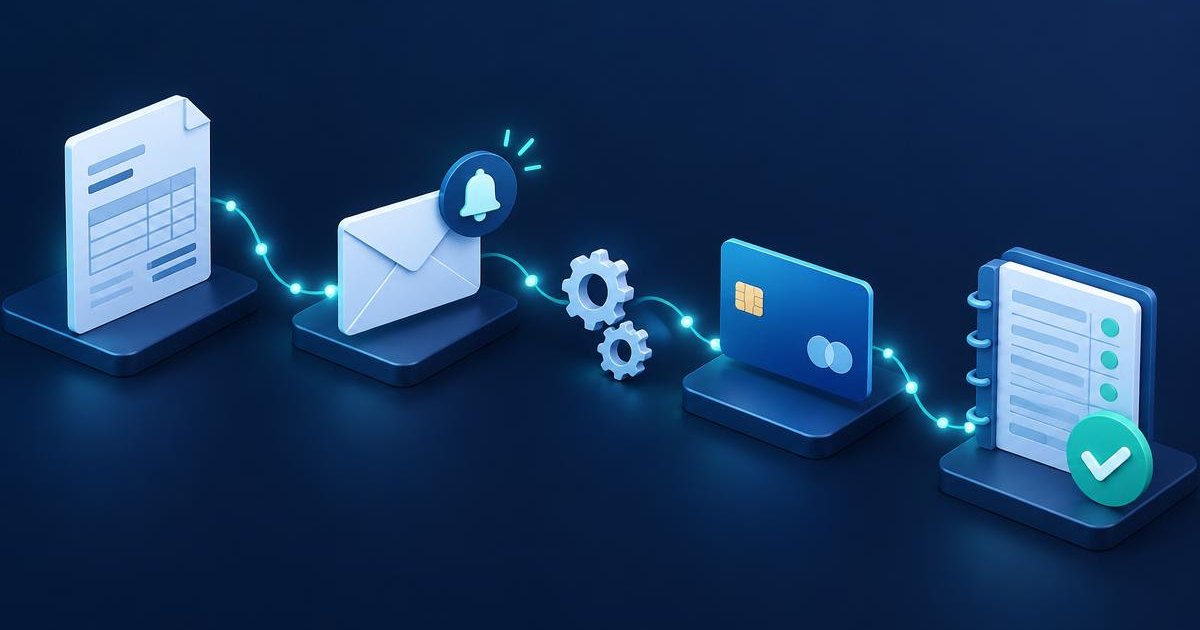
An automated accounts receivable process connects your accounting, your bank and your customer communication. Invoices go out right after delivery, reminders are sent automatically based on the due date, payments are reconciled automatically and you only step in for exceptions. You build it in seven steps: customer onboarding, invoicing, pre-reminders, reminder schedule, escalation, reconciliation and analysis.
In short (TL;DR)
- An invoice is only done when the money is in your account and the item is reconciled. Everything in between can be automated.
- The biggest gain isn't stricter demands, but paying earlier, more consistently and more easily: pre-reminders, payment links and a fixed schedule.
- Automate the rule, not the exception. Disputes and customers on a payment plan get a human; the rest runs by itself.
- The Dutch government plans mandatory B2B e-invoicing from 1 July 2030. Structured invoicing now makes you compliant later — and paid faster today.
Why automating pays off right now
Payment behaviour of Dutch businesses is moving the wrong way. In 2025, 25.3% of invoices were not paid within the agreed term, up from 23.9% a year earlier, according to Altares Dun & Bradstreet. It was the first deterioration since 2001, and smaller companies in particular paid late more often.
The total cycle is long too. According to the Order to Cash Monitor 2026 by Windesheim University of Applied Sciences and 4CEE, the average time from order to payment has risen to 59 days, with another 29 days on average when there is a dispute. Delays arise in almost every phase — from order entry and delivery to invoicing, payment and reconciliation. So the problem isn't only the customer who pays late, but also your own process.
And it costs money. Exact's SME Barometer 2026 found that on average 15% of customers pay late and 3% of invoices are never paid; two in three Dutch SMEs lose revenue as a result, on average €20,000 a year. Notably, 47% of business owners have no idea of their customers' average payment term. You can't manage what you don't measure.
There's also a legal deadline. On 11 September 2026 the Dutch government announced e-invoicing and reporting for both international and domestic B2B transactions from 1 July 2030, with digital reporting for domestic transactions from 1 July 2031. Digitising your invoicing now kills two birds with one stone.
What is an automated accounts receivable process?
An automated accounts receivable process (also called order-to-cash or quote-to-cash) is a fixed sequence of steps in which software, based on rules and data, follows up open invoices on its own: sending invoices, sending reminders, offering payment options, matching payments and flagging risks.
The difference with manual credit control isn't that humans disappear. It's that people only step in where human judgement adds value: a dispute, a payment plan or a customer who is structurally falling behind.
Step 1: Customer onboarding and payment terms
The receivables process doesn't start with the invoice but with the quote. Before the first delivery, record:
- the payment term (and whether it is legally allowed);
- the billing address, the accounts payable email address and any purchase order number;
- whether a credit limit or prepayment is needed.
Mind the legal framework. In the Netherlands the maximum payment term between businesses is 60 days unless agreed otherwise and not grossly unfair; large companies must pay SMEs and freelancers within 30 days. Without an agreed term, 30 days applies. Background: Average payment term in the Netherlands.
What you automate: a mandatory field for payment term and billing contact for every new customer, plus an automatic credit check above a threshold amount.
Step 2: Invoice immediately and without errors
Every day an invoice goes out later is a day later you get paid. Link invoicing to the moment of delivery, not to ‘end of month’. An invoice that wants to be paid contains:
- the customer's correct purchase order number or reference;
- a clear due date (not ‘30 days’, but a date);
- a payment link next to the IBAN;
- the right contact person for questions.
What you automate: generating invoices from your order or project system and, where possible, a structured e-invoice. An invoice that lands in your customer's accounting system without retyping gets approved faster. See Peppol invoices paid faster.
Step 3: The pre-reminder (the most underrated step)
Three to five days before the due date, send a friendly message: ‘FYI: invoice X is due on Friday. You can pay directly here.’ This isn't a demand, it's service. Many late payments aren't caused by unwillingness but by an invoice stuck somewhere in an approval flow. The pre-reminder surfaces those cases before they're late.
What you automate: a trigger on due date minus X days, with payment link and the original invoice attached.
Step 4: A staged reminder schedule
A good schedule is consistent, gets slightly firmer with each message and stops automatically once paid. An example for B2B (adjust the days to your own payment terms and customer segments):
| Moment | Action |
|---|---|
| Day −5 | Friendly pre-reminder with payment link |
| Day 0 | Due date: short notice with payment link |
| Day +3 | First reminder by email |
| Day +10 | Second reminder, also via a second channel (SMS or WhatsApp) |
| Day +17 | Personal phone call: the moment for a human |
| Day +24 | Formal demand; for Dutch consumers the 14-day letter |
| Day +40 | Escalation decision: payment plan, finish self-collection or outsource |
Important: segment. A loyal customer with ten years of history gets a different tone than a new customer who has already paid late twice. For wording, see Payment reminder and demand letter examples. Using WhatsApp as the second channel? Read WhatsApp payment reminders: what's allowed and what works first.
Step 5: Escalation on the right legal basis
If payment doesn't come, you have legal instruments. In the Netherlands, statutory commercial interest has been 10.4% since 1 July 2026, and statutory interest for non-commercial transactions 4% since 1 January 2026. You can also charge extrajudicial collection costs under the WIK scale — for consumers only after a correct 14-day letter.
Automation mainly helps with precision: calculating daily interest correctly, applying the right scale and sending the letter at the right moment. Mistakes in this phase can later cost you the additional costs in court. Read When to hire a debt collection agency to know when to hand a claim over.
What you automate: interest and cost calculation, generating the demand and recording every contact moment as an evidence file.
Step 6: Automatic reconciliation
A payment that arrives but isn't matched to the right invoice causes two problems: your customer wrongly receives a reminder (bad for the relationship) and you have no up-to-date view of your open items.
What you automate: a bank or accounting connection that matches payments by invoice number, amount and IBAN, recognises partial payments and only escalates doubtful cases to a person. As soon as an item is reconciled, the reminder schedule stops immediately.
Step 7: Measure and adjust
Without data, credit control stays firefighting. Track at least:
- DSO (Days Sales Outstanding): how many days of revenue are outstanding on average?
- Ageing analysis: how much is open 0–30, 31–60, 61–90 and 90+ days?
- Payment behaviour per customer: who pays late structurally and who is getting worse?
- Effectiveness per reminder: after which message do most customers pay?
Use those insights to adjust your schedule, payment terms and customer onboarding. Reduce DSO: 15 ways to get invoices paid faster has concrete tactics.
Manual versus automated accounts receivable
| Area | Manual | Automated |
|---|---|---|
| Reminders | When there's time | At fixed moments, always |
| Payment option | Retyping the IBAN | Payment link in every message |
| Reconciliation | Bank statement next to Excel | Automatic matching |
| Insight | Monthly ageing list | Real-time DSO dashboard |
| Tone | Depends on mood | Consistent and per customer |
| Time per week | Hours | Minutes (exceptions only) |
6 common mistakes when automating accounts receivable
- Automating without segmentation: the same tone for your biggest customer as for a one-off buyer costs relationships.
- No stop condition: reminding a customer who paid yesterday or reported a dispute is the fastest route to irritation.
- Not separating disputes: an invoice with a substantive problem doesn't belong in the reminder schedule but with a human.
- Email only: reminders vanish into spam filters and shared inboxes. Use a second channel.
- No payment link: every extra action (retyping an IBAN, looking up a reference) is a reason to do it ‘later’.
- Forgetting to measure: without DSO and ageing you don't know whether your process works.
Checklist: is your receivables process ready for automation?
- Every customer has a recorded payment term and billing contact.
- Invoices go out within 24 hours of delivery.
- Every invoice has a due date, reference and payment link.
- A pre-reminder goes out before the due date.
- There's a fixed, staged reminder schedule per customer segment.
- The schedule stops automatically on payment or dispute.
- Interest and collection costs are calculated correctly and automatically.
- Payments are reconciled automatically via a bank or accounting connection.
- You review DSO and ageing at least monthly.
- Your invoicing process is prepared for e-invoicing.
How Credimigo runs this process for you
Credimigo is AI-driven software for accounts receivable and self-collection, built for businesses in the Netherlands and Belgium. You remain the creditor; Credimigo automates the process. Connect your accounting and Credimigo takes over follow-up: pre-reminders, staged multi-channel reminders, payment links, correct interest and cost calculation and real-time DSO insight. You stay in control and step in only where it matters.
Using Moneybird? Also read Automate Moneybird accounts receivable. Weighing doing it yourself against outsourcing? Read Outsource or automate accounts receivable?
Conclusion
An invoice is only finished when the money is in and the item is reconciled. Leaving that journey to ad-hoc actions and good intentions costs you a high DSO, lost revenue and wasted hours. Build your receivables process as a system: fixed triggers, clear rules, automatic execution and a human for the exceptions.
Frequently asked questions
What is an automated accounts receivable process?
A fixed sequence of steps in which software follows up invoices on its own: sending, reminding, offering payment options, reconciling payments and flagging risks. A person only steps in for exceptions such as disputes or payment plans.
Which receivables steps can you automate?
Almost all routine steps: invoicing after delivery, pre-reminders, reminders, interest and cost calculation, generating demands, reconciling payments and reporting such as DSO and ageing.
When should you send the first payment reminder?
Start before the due date with a friendly pre-reminder, three to five days ahead. The first real reminder usually follows a few days after the due date.
What is the statutory payment term between businesses in the Netherlands?
Without an agreed term, 30 days applies. The maximum between businesses is 60 days unless agreed otherwise and not grossly unfair. Large companies must pay SMEs and freelancers within 30 days.
What is the Dutch statutory commercial interest rate in 2026?
Since 1 July 2026 the statutory interest rate for commercial transactions is 10.4%. The rate is reviewed every six months, so check the current rate on Rijksoverheid.nl.
Will e-invoicing become mandatory in the Netherlands?
That's the plan. On 11 September 2026 the Dutch government announced e-invoicing and reporting for international and domestic B2B transactions from 1 July 2030; details are still being worked out. In Belgium, e-invoicing has been mandatory for domestic B2B transactions since 1 January 2026.
Does automation harm the customer relationship?
No, rather the opposite. Consistent, friendly and timely communication with an easy payment link feels like service. It's irregular, late or unjustified reminders that damage relationships.
Bronnen
- Rijksoverheid – Hoogte wettelijke rente
- Ondernemersplein – Betalingstermijnen, incassokosten en wettelijke rente
- Rijksoverheid – Kabinet kiest voor invoering e-facturatie en rapportage voor bedrijven (11 september 2026)
- FOD Financiën – Voor wie wordt e-facturatie verplicht (België)
- Accountant.nl – Nederlandse bedrijven wachten gemiddeld 59 dagen op hun geld (Order to Cash Monitor 2026)
- Accountant.nl – Betaalgedrag Nederlandse bedrijven is vorig jaar verslechterd (Altares Dun & Bradstreet)
- Exact – MKB Barometer 2026: mkb'ers lopen gemiddeld €20.000 mis
- MKB Servicedesk – Mkb'er loopt gemiddeld €20.000 omzet mis door onbetaalde facturen
Analyseer je eerste factuur gratis
Upload een openstaande factuur en zie binnen een minuut je Recovery Score, de juiste taal voor je debiteur en een kant-en-klare laatste aanmaning.
Analyse an invoice freeKeep reading
- Reduce DSO: 15 ways to get invoices paid faster
- WhatsApp payment reminders: what's allowed and what works
- Payment reminder and demand letter examples
- Accounts receivable automation: complete guide
- Automate Moneybird accounts receivable
- Get invoices paid faster: follow-up schedule
- Debiteurenproces automatiseren (NL)
- Automate Moneybird accounts receivable: 2026 guide
- Automate Odoo accounts receivable: 2026 guide